
Download Spiceworks Desktop – network scanner, device monitoring, IT management, system inventory, network inventory
Overview
Spiceworks Desktop is a specialized tool designed for IT professionals and network administrators seeking comprehensive visibility into their local network environments. Its primary purpose is to scan and inventory all connected devices—ranging from workstations and printers to servers and peripheral hardware—providing real-time data on their status, configuration, and software installations. This capability addresses common challenges in network management, such as untracked devices, outdated software, and hardware inconsistencies, which can compromise security and performance. The app is particularly beneficial for small to medium-sized enterprises that require efficient, centralized oversight without relying on complex enterprise-grade solutions.
Target users include IT teams, system administrators, and technical staff responsible for maintaining network integrity, compliance, and operational efficiency. By delivering a unified view of network assets, Spiceworks Desktop enables proactive maintenance, faster troubleshooting, and improved resource allocation. While the developer, Spiceworks, is known for its broader IT community and tools, specific organizational background was not provided. The app’s real-world use cases include identifying unauthorized devices, monitoring software licenses, detecting system vulnerabilities, and generating reports for audits or compliance checks. In the broader productivity and IT management ecosystem, Spiceworks Desktop fills a critical niche by offering a free, accessible, and powerful network inventory solution tailored for Windows-based environments.
Key Features & Functionality
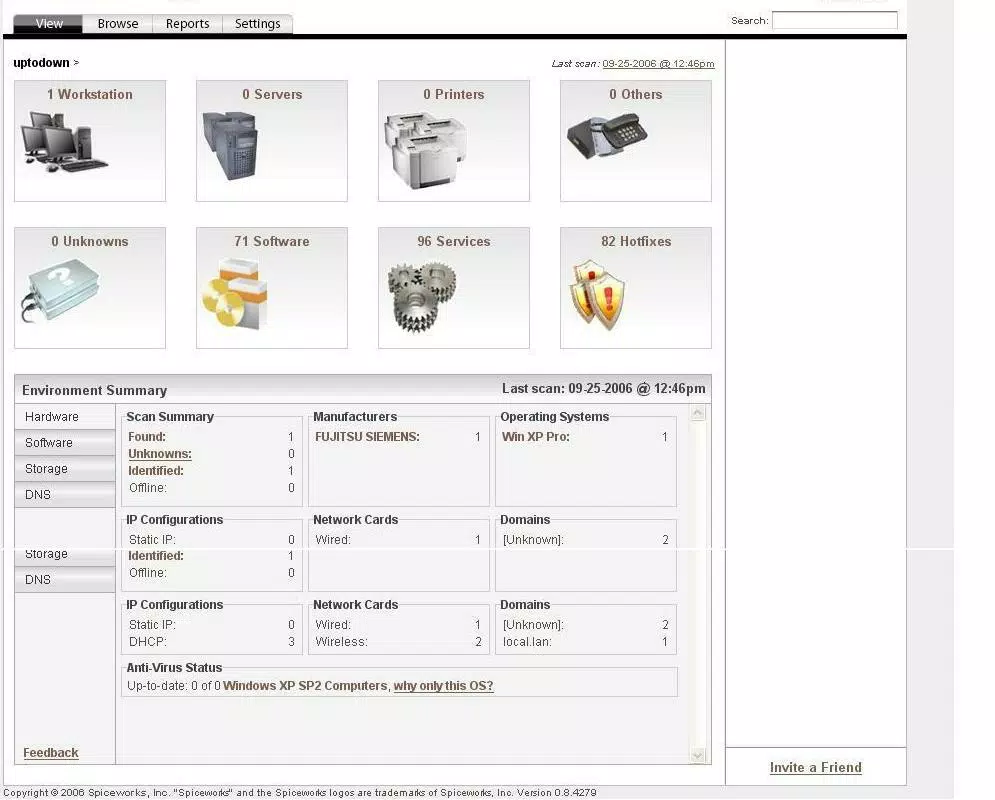
- Comprehensive Network Scanning: The app automatically scans the entire local network to detect all connected devices, including their IP addresses, MAC addresses, operating systems, and hardware specifications. This feature ensures no device goes unnoticed, supporting both proactive monitoring and reactive troubleshooting.
- Customizable Interface: Users can personalize the main dashboard by modifying labels, icons, and layout elements. This flexibility allows teams to organize information based on their workflow, enhancing usability and reducing cognitive load during daily operations.
- Detailed Workstation Management: Spiceworks provides in-depth insights into individual workstations, including installed software, running processes, and system health indicators. This granular visibility helps identify outdated software, unauthorized applications, or performance bottlenecks.
- Scalability for Medium-Sized Networks: Designed to manage networks with up to 250 workstations, the tool maintains performance and reliability even under moderate load, making it suitable for growing organizations that need scalable yet lightweight solutions.
For example, an IT administrator can use the network scan feature to detect a rogue device connected to the corporate network, then use the workstation details to determine if it poses a security risk. Similarly, a team can leverage the customizable interface to create a dashboard focused on software compliance, ensuring all devices meet licensing requirements. These features collectively support efficient, data-driven decision-making in IT operations.
Interface, UX & Performance
Spiceworks Desktop features a clean, information-dense interface optimized for desktop use. The layout organizes data into clearly labeled sections—such as devices, software, and alerts—enabling quick navigation between different aspects of network management. Visual indicators, like color-coded status icons, help users instantly assess the health of connected devices, reducing the time needed to identify issues.
Navigation is intuitive, with a sidebar menu and search functionality that allow users to locate specific devices or software quickly. The app supports drag-and-drop customization of the dashboard, allowing users to prioritize the most relevant data. Although the developer did not list formal performance metrics, the application is designed to run efficiently on standard Windows workstations, with minimal impact on system resources during regular operation.
Responsiveness is consistent across various device categories, including laptops and desktops, ensuring a stable experience during extended use. Stability appears to be maintained through regular updates, though the last release was in 2015. Users should expect reliable performance for typical administrative tasks, though long-term compatibility with newer Windows versions may require verification.
Platform Compatibility & Technical Requirements
Spiceworks Desktop is available exclusively for the Windows platform. The current version is 7.1, with a file size of 185.5 MB. The app is free to download and install, making it accessible to budget-conscious IT teams and individual administrators. The developer did not specify minimum OS requirements or hardware specifications, so compatibility with modern Windows systems should be verified before installation.
Given its release date of 2015, users should exercise caution when deploying the app on newer Windows versions, as it may lack support for recent system updates, security protocols, or API changes. It is recommended to test the application in a controlled environment before full deployment. No additional dependencies or third-party tools are required for basic functionality.
Pros and Cons
Pros
- Free to download and use, reducing entry barriers for small teams.
- Offers comprehensive network scanning and device inventory.
- Highly customizable interface for personalized workflow setup.
- Scalable for networks with up to 250 devices.
- Provides detailed workstation and software status information.
Cons
- Latest release was in 2015; no recent updates may affect compatibility.
- Platform limited to Windows; no support for macOS or Linux.
- Developer did not provide minimum OS or hardware requirements.
- May not support newer Windows security features or updates.
- Limited to desktop use; no mobile companion app available.
FAQ
Is Spiceworks Desktop safe to install?
Yes, the app is free and distributed through official channels. However, due to its age and lack of recent updates, users should ensure their system is protected with up-to-date antivirus software before installation.
Can I use Spiceworks Desktop on Windows 10 or Windows 11?
While the app was released in 2015, it may function on newer Windows versions. However, compatibility is not guaranteed, and users should test it in a non-production environment first.
Does Spiceworks Desktop require a license?
No, the app is completely free and does not require a license key or subscription for use.
Is there a mobile version of Spiceworks Desktop?
There is no mobile version available. The app is designed for desktop use only and does not support Android or iOS devices.
How often does Spiceworks Desktop update?
The last official release was in 2015. No further updates have been issued since then, so the app is considered outdated by current standards.
Final Thoughts
Spiceworks Desktop remains a notable tool for IT professionals managing small to medium-sized networks, offering robust network scanning and detailed device monitoring at no cost. Its customizable interface and scalable architecture provide tangible value for teams seeking a centralized system inventory solution. While the app’s age and lack of updates are significant limitations, it still delivers core functionality that can support essential IT operations in legacy environments.
For administrators using older Windows systems or maintaining stable, low-change networks, Spiceworks Desktop may still be a viable option. However, users should carefully assess compatibility and security implications before deployment. The app’s strengths in network visibility and ease of use are balanced by its outdated status and limited platform support.
Download Spiceworks Desktop now


